No meeting bot
Capture the audio from your computer instead of adding another participant to the call. It works across Meet, Zoom, Teams, Slack, Webex and other meeting apps.

Transcribe without a meeting bot, turn the conversation into structured notes and review suggested actions beside the work your team already has.
The AI note-taker keeps the source, creates a clearer version and helps connect the conversation to real work in Superthread.
Capture the audio from your computer instead of adding another participant to the call. It works across Meet, Zoom, Teams, Slack, Webex and other meeting apps.
Keep the original transcript, then turn it into structured notes that are easier to scan, share and act on.
Use a built-in template or make your own. A sales call, sprint review and candidate interview should not all produce the same generic summary.
Superthread can suggest creating or updating tasks from the conversation. Accept the useful actions and reject the rest before anything changes.
AI can find tasks related to the discussion, so the note starts with more of the workspace context already attached.
Connect your calendar, prepare notes from upcoming events and choose whether transcription should start automatically when a meeting begins.
Superthread transcribes your meetings, compares the discussion to existing work, then suggests tasks, and highlights decisions – just review and get back to work.
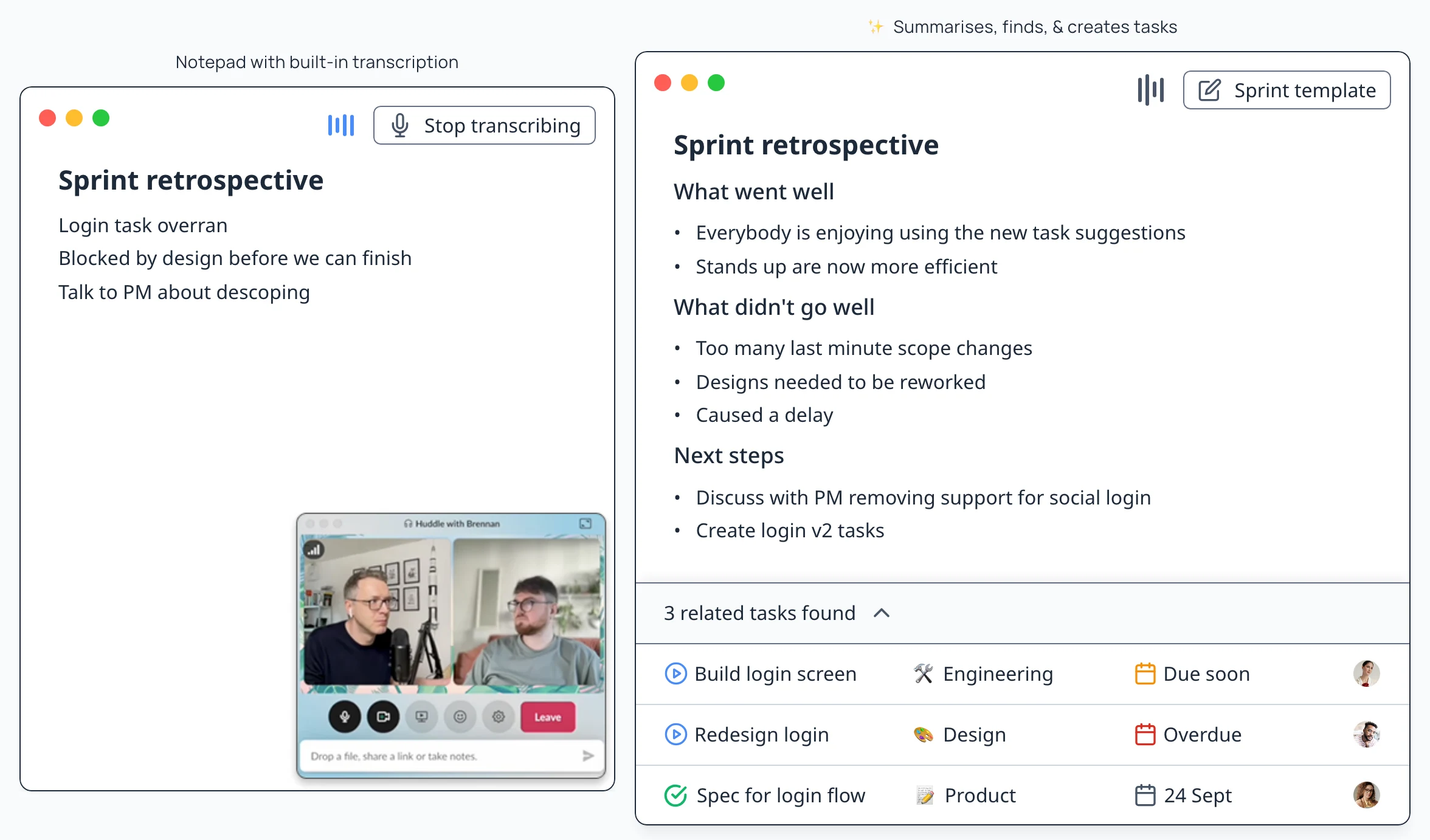
Superthread transcribes audio directly from your laptop or iphone, so no annoying bots join the call.





Create note templates that guide the AI to ensure your notes are consistently formatted and summarised in the most helpful way for you. Here are some Superthread ships with.
📅 June 10, 2025 Chloe, Ben, Amira +2
Introductory discussion
░░░░░░░░░░░
░░░░░░
Key recommendations
░░░░░░░░░░░
░░░░░░
Market insights
░░░░░░░░░░░
░░░░░░
Offers of support
░░░░░░░░░░░
░░░░░░
Action items
░░░░░░░░░░░
░░░░░░
📅 June 10, 2025 Dana, Luis, Priya +4
Announcements
░░░░░░░░░░░
░░░░░░
Individual updates
░░░░░░░░░░░
░░░░░░
Additional topics
░░░░░░░░░░░
░░░░░░
Action items
░░░░░░░░░░░
░░░░░░
📅 June 10, 2025 Nora, James, Elliot +3
Problem Statement
░░░░░░░░░░░
░░░░░░
Key Themes
░░░░░░░░░░░
░░░░░░
Proposed Solutions
░░░░░░░░░░░
░░░░░░
Next Steps
░░░░░░░░░░░
░░░░░░
📅 June 10, 2025 Adam, Mei, Carla +4
What went well
░░░░░░░░░░░
░░░░░░
Areas for improvement
░░░░░░░░░░░
░░░░░░
Key lessons learned
░░░░░░░░░░░
░░░░░░
Action items
░░░░░░░░░░░
░░░░░░
📅 June 10, 2025 Leah, Tomás, Grace +1
Initial reactions
░░░░░░░░░░░
░░░░░░
Questions and clarifications
░░░░░░░░░░░
░░░░░░
Feedback and suggestions
░░░░░░░░░░░
░░░░░░
Next steps
░░░░░░░░░░░
░░░░░░
📅 June 10, 2025 Emily, Raj, Lucas +5
Announcements
░░░░░░░░░░░
░░░░░░
Progress Update
░░░░░░░░░░░
░░░░░░
Significant Achievements
░░░░░░░░░░░
░░░░░░
Challenges and Required Adjustments
░░░░░░░░░░░
░░░░░░
Action Items and Responsibilities
░░░░░░░░░░░
░░░░░░
📅 June 10, 2025 Sophie, Daniel
Immediate Priorities
░░░░░░░░░░░
░░░░░░
Progress & Accomplishments
░░░░░░░░░░░
░░░░░░
Obstacles & Bottlenecks
░░░░░░░░░░░
░░░░░░
Feedback Exchange
░░░░░░░░░░░
░░░░░░
Next Steps
░░░░░░░░░░░
░░░░░░
📅 June 10, 2025 Mia, Jason, Elena +3
Review of previous Sprint
░░░░░░░░░░░
░░░░░░
Backlog Prioritization
░░░░░░░░░░░
░░░░░░
Key achievements
░░░░░░░░░░░
░░░░░░
Sprint Goals and Objectives
░░░░░░░░░░░
░░░░░░
Task Assignment and Capacity Planning
░░░░░░░░░░░
░░░░░░
📅 June 10, 2025 Sam, Olivia, Matt +3
Project status
░░░░░░░░░░░
░░░░░░
Challenges and Blockers
░░░░░░░░░░░
░░░░░░
Upcoming Tasks and Milestones
░░░░░░░░░░░
░░░░░░
Team Collaboration and Action Items
░░░░░░░░░░░
░░░░░░
📅 June 10, 2025 David, Laura, Candidate +1
Their background
░░░░░░░░░░░
░░░░░░
Skills and experience
░░░░░░░░░░░
░░░░░░
Motivation and fit
░░░░░░░░░░░
░░░░░░
Availability and salary expectations
░░░░░░░░░░░
░░░░░░
My thoughts
░░░░░░░░░░░
░░░░░░
Next steps
░░░░░░░░░░░
░░░░░░
📅 June 10, 2025 Karen, Victor +1
Their background
░░░░░░░░░░░
░░░░░░
Current product usage
░░░░░░░░░░░
░░░░░░
Feedback
░░░░░░░░░░░
░░░░░░
Impact of the product
░░░░░░░░░░░
░░░░░░
Next steps and follow up
░░░░░░░░░░░
░░░░░░

“We’ve centralised task boards from disparate tools into a single, slick workflow. It’s saving us time and restoring some of the joy of creating tickets!”
Keep what the client said, what the team decided and what needs to happen next in the same system as delivery.
Capture decisions without assigning someone to spend the meeting typing and tidying notes afterward.
Read the full guide for setup, everyday workflows, and detailed feature behaviour.
Move work from your existing tools with native imports, MCP, API access, or a spreadsheet


